> For the complete documentation index, see [llms.txt](https://docs.xygeni.io/llms.txt). Markdown versions of documentation pages are available by appending `.md` to page URLs; this page is available as [Markdown](https://docs.xygeni.io/xygeni-products/scan-management/xygeni-bot.md).
# Xygeni Bot
The **Xygeni Bot** brings automation into the remediation workflow for SAST, SCA, Secrets, IaC, and CI/CD findings. It enables teams to define how and when remediation runs:
* **On-demand execution** for manual control
* **On every PR** to keep branches clean at merge time
* **Daily scheduled runs** for continuous upkeep
The bot integrates directly into the development process, creating **pull requests with fixes**. Developers only need to review and approve or reject the changes, which streamlines collaboration and reduces remediation workload.
With this capability, organizations establish a **continuous remediation loop**—security issues are fixed proactively while developers stay focused on delivering new features and innovations.
## Integration
### Automatic
{% hint style="info" %}
This requires to have your project properly integrated within Managed Scans. See [Managed Scans](/xygeni-products/scan-management/managed-scans.md) for further information
{% endhint %}
1. **Navigate to Projects View**: After integrating your project with the managed scans, go to the Projects view.
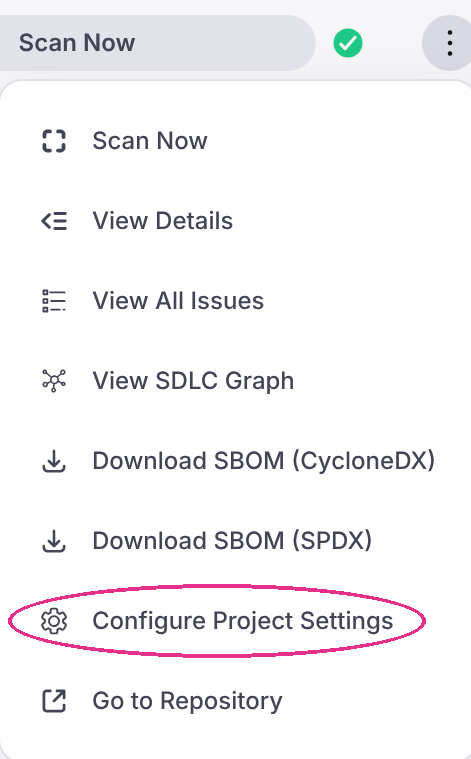
2. **Click the three dots menu for the project you have integrated**
1. **Click "Configure Project Settings"**:
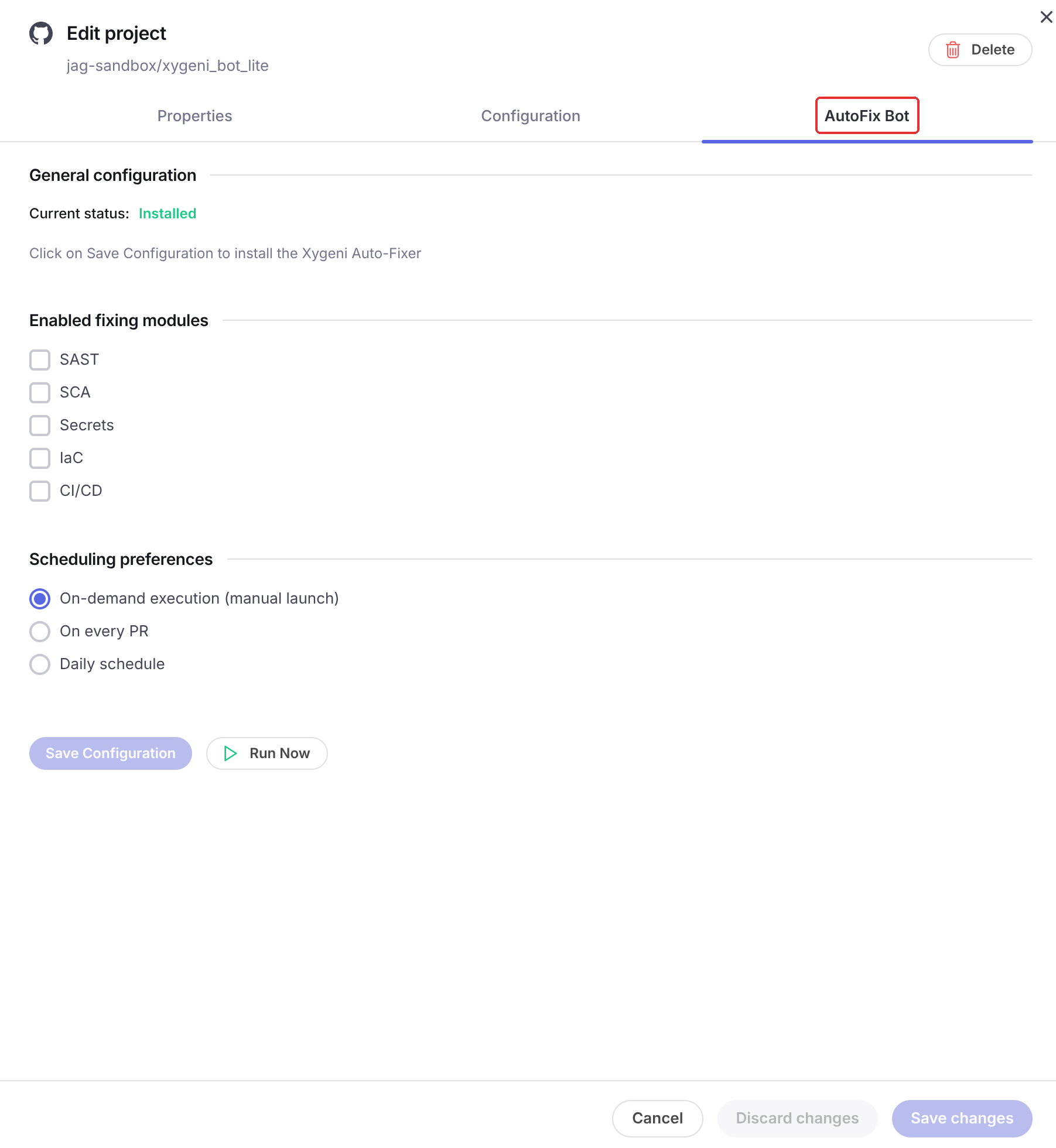
4. **Select the "AutoFix Bot" tab**
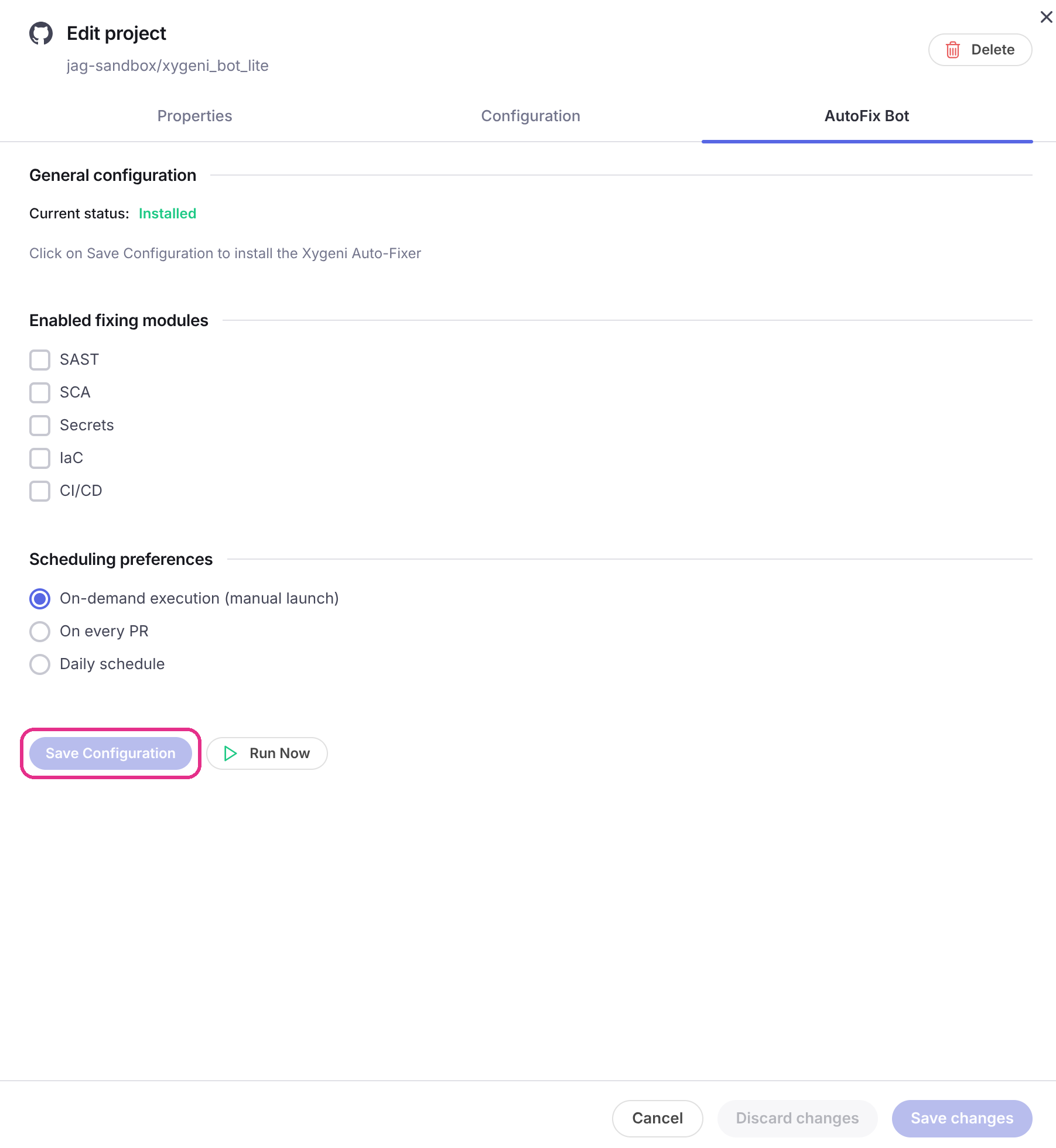
5. **Configure the bot and save configuration**
The modules you select — **SCA**, **Secrets**, **SAST**, **IaC** and **CI/CD** — are the scans that the workflow committed by the bot into your repository will run, so only the findings of the selected modules are remediated. A module can be selected when your subscription includes it.
### Manual
XygeniBot can also be configured manually if you prefer to test its behaviour first.
For manually integrating it just place the following `xygenibot.yml` within the root directory of your repository.
{% hint style="info" %}
`xygenibot.yml` has two sections only: `deps` for SCA remediation, and `sast` for the AI-generated fixes of **SAST**, **IaC** and **CI/CD** findings. There is no `iac` or `misconf` section — see [IaC and CI/CD](#iac-and-ci-cd) below.
{% endhint %}
```yaml
deps:
# Pull request strategy:
# always: always create the PR.
# no-duplicate: create PR only if not exists a PR with the same component, version and fix version (open or close).
# create-if-close: create PR if not exists a PR with the same component, version and fix version or this is closed (default value).
pull-request-strategy: 'create-if-close'
# Dependencies filter to include/exclude dependencies
filter-includes:
- group: '*'
name: '*'
filter-excludes:
- group: '*'
name: '*'
# Dependencies for bumping
# direct: only direct dependencies
# indirect: only indirect dependencies
# in-app-code: only dependencies that will be part of the application, that is, those dependencies for development or testing will be excluded.
# with-vulnerabilities: only dependencies with known vulnerabilities
dependency-types:
- 'direct'
- 'indirect'
- 'in-app-code'
- 'with-vulnerabilities'
# Bumping version strategies:
# all: bump to the latest version for the component.
# minor: bump with the same major version (for example 1.x.x -> max version less than 2.0.0).
# patch: bump with the same major and minor versions (for example 1.1.x -> max version less than 1.2.0).
# without-vulnerabilities: bump to the first version without vulnerabilities
# compatible: bump with max version compatible with the current (unsupported for private repositories).
# exclude-pre-release: pre-release will be excluded for the bump version.
bumping-version-strategies:
- 'all'
- 'minor'
- 'patch'
- 'without-vulnerabilities'
- 'compatible'
- 'exclude-pre-release'
#Only use the repositories configured in 'repositories' section
only-use-repositories-configured: false
# Repositories to find component versions
repositories:
- type: 'maven'
url: 'https://.....'
directory: '/home/.m2/repository'
username: ....
password: '${pass}'
# Configuration by package manager (maven, npm, pypi,...)
package-managers:
- type: 'maven'
# Pull request strategy:
# always: always create the PR.
# no-duplicate: create PR only if not exists a PR with the same component, version and fix version (open or close).
# create-if-close: create PR if not exists a PR with the same component, version and fix version or this is closed (default value).
pull-request-strategy: 'create-if-close'
# Dependencies filter to include/exclude dependencies
filter-includes:
- group: '*'
name: '*'
filter-excludes:
- group: '*'
name: '*'
# Dependencies for bumping
# direct: only direct dependencies
# indirect: only indirect dependencies
# in-app-code: only dependencies that will be part of the application, that is, those dependencies for development or testing will be excluded.
# with-vulnerabilities: only dependencies with known vulnerabilities
dependency-types:
- 'direct'
- 'indirect'
- 'in-app-code'
- 'with-vulnerabilities'
# Bumping version strategies:
# all: bump to the latest version for the component.
# minor: bump with the same major version (for example 1.x.x -> max version less than 2.0.0).
# patch: bump with the same major and minor versions (for example 1.1.x -> max version less than 1.2.0).
# compatible: bump with max version compatible with the current (unsupported for private repositories).
# exclude-pre-release: pre-release will be excluded for the bump version.
bumping-version-strategies:
- 'all'
- 'minor'
- 'patch'
- 'compatible'
- 'exclude-pre-release'
#Only use the repositories configured in 'repositories' section
only-use-repositories-configured: false
# Repositories to find component versions
repositories:
- type: 'maven'
url: 'https://.....'
directory: '/home/.m2/repository'
username: ....
password: '${pass}'
sast:
# Pull request strategy:
# always: always create the PR.
# no-duplicate: create PR only if not exists a PR with the same component, version and fix version (open or close).
# create-if-close: create PR if not exists a PR with the same component, version and fix version or this is closed (default value).
pull-request-strategy: 'create-if-close'
# Max pull request created:
max-pull-request: 0
# Files filter to include/exclude vulnerabilities remediation
# filter-includes: list of glob patterns to include to remediate vulnerabilities.
#
# A pattern could use ** (to match zero or more directories), * (zero or more characters
# in a directory or file name), and ? (one character).
# Examples: **/*.java matches all files with 'java' extension. **/java/** matches all files under any java directory.
#
# If empty, ALL files will be matched.
#
# A file is analyzed when matched by 'filter-includes' AND NOT matched by 'filter-excludes'.
filter-includes:
# filter-excludes: list of glob patterns to exclude to remediate vulnerabilities.
# If empty, NO file will be excluded
filter-excludes:
# Vulnerabilities to remediate
# in-app-code: only vulnerabilities that will be part of the application, that is, those vulnerabilities for development or testing will be excluded.
tags:
- 'in-app-code'
# Languages of vulnerabilities to remediate
languages:
# severities of vulnerabilities to remediate
severities:
- 'critical'
- 'high'
- 'low'
- 'info'
# list of ruleId to include to remediate vulnerabilities.
# If empty, ALL rules.
rule-ids-includes:
# rule-ids-excludes: list of ruleId to exclude to remediate vulnerabilities.
# If empty, NO rule will be excluded
rule-ids-excludes:
# Remediation strategies:
# fix-all-files: one pr to remediate all vulnerabilities.
# fix-all-by-file: one pr to remediate all vulnerabilities in a file
# fix-one-by-file: one pr to remediate all vulnerabilities of same rule in a file
# fix-all-same-rule-files: one pr to remediate all vulnerabilities of same rule in all files
remediation-strategy: 'fix-all-by-file'
ai-agents:
# Use the default Xygeni Remediation AI
xygeni:
# Or configure these agents to use your own Remediation AI
anthropic:
host: ${ANTHROPIC_HOST:-https://api.anthropic.com/v1}
token: ${ANTHROPIC_TOKEN}
model: ${ANTHROPIC_MODEL:-claude-sonnet-4-20250514}
gemini:
host: ${GEMINI_HOST:-https://generativelanguage.googleapis.com/v1beta}
token: ${GEMINI_TOKEN}
model: ${GEMINI_MODEL:-gemini-2.5-flash}
groq:
host: ${GROQ_HOST:-https://api.groq.com/openai/v1}
token: ${GROQ_TOKEN}
model: ${GROQ_MODEL:-llama-3.1-8b-instant}
openai:
host: ${OPENAI_HOST:-https://api.openai.com/v1}
token: ${OPENAI_TOKEN}
model: ${OPENAI_MODEL:-gpt-4o}
openrouter:
host: ${OPENROUTER_HOST:-https://openrouter.ai/api/v1}
token: ${OPENROUTER_TOKEN}
model: ${OPENROUTER_MODEL:-openai/gpt-4o}
# Microsoft Foundry / Azure OpenAI. host is the bare resource endpoint; deployment is the model.
# Auth is auto-detected: set token for api-key, or tenant-id/client-id/client-secret for service principal.
foundry:
host: ${FOUNDRY_HOST}
deployment: ${FOUNDRY_DEPLOYMENT}
token: ${FOUNDRY_TOKEN}
# Custom / OpenAI-compatible: a gateway or a self-hosted server. host (base URL ending in the
# version path, e.g. .../v1) and model are required. Select it with ai-remediation-agent: openai_compatible.
openai-compatible:
host: ${OPENAI_COMPATIBLE_HOST}
model: ${OPENAI_COMPATIBLE_MODEL}
token: ${OPENAI_COMPATIBLE_API_KEY}
api: chat # chat (default) or responses
# This property sets the AI agent to be used. One of the available within ai-agents.
# Use global to use the integration configured into your account if any; Else it defaults to xygeni
ai-remediation-agent: global
```
After that, you should be able to run `xygeni scan -d --auto-remediate` and the XygeniBot will try to remediate all the issues that match your preferences according to your configuration settings.
To remediate only some of the scans, add the `--run` parameter, for example `xygeni scan -d --run=deps,secrets,iac,misconf,sast --auto-remediate`. CI/CD findings are produced by the `misconf` scan, which is the name to use in `--run`.
{% hint style="info" %}
For the AI Triage flow, `xygenibot.yml` is consulted first; the equivalent top-level `ai-agents` / `ai-agent` keys in `xygeni.yml` are used as a fallback when the field is not declared in `xygenibot.yml`. Auto-remediation always reads from `xygenibot.yml`. See [AI Agents Configuration](/xygeni-products/scan-management/ai-agents-configuration.md) for the full schema, precedence rules, and steps to move the configuration to `xygeni.yml`.
{% endhint %}
## Configuration settings
### SCA (deps)
* **pull-request-strategy**: Indicates the PR strategy to follow. Allowed values are: `always`, `no-duplicate`, `create-if-close`.
* **filter-includes**: Indicates the dependencies includes filter by using glob patterns.
* **filter-excludes**: Indicates the dependencies excludes filter by using glob patterns.
* **dependency-types**: Indicates the dependencies for bumping. Allowed values are: `direct`, `indirect`, `in-app-code` and `with-vulnerabilities`.
* **bumping-version-strategies**: Indicates the bumping version strategies. Allowed values are: `all`, `minor`, `patch`, `without-vulnerabilities`, `compatible`, `exclude-pre-release`.
* **only-use-repositories-configured**: Indicates whether to only use the repositories configured in repositories section.
* **repositories**: Indicates the repositories to find component versions. Currently `maven` is supported.
* **package-managers**: Indicates specific configuration settings for every package manager.
### SAST
* **pull-request-strategy**: Indicates the Pull Request strategy to follow. Allowed values are: `always`, `no-duplicate`, `create-if-close`.
* **max-pull-request**: Indicates the .
* **filter-includes**: Indicates list of glob patterns to include the vulnerabilities to remediate.
* **filter-excludes**: Indicates list of glob patterns to exclude the vulnerabilities to remediate.
* **tags**: Indicates the list of tags used to filter the vulnerabilities to remediate.
* **languages**: Indicates the list of languages used to filter the vulnerabilities to remediate.
* **severities**: Indicates the list of severities used to filter the vulnerabilities to remediate. Allowed values are: `critical`, `high`, `low`, `info`.
* **rule-ids-includes**: Indicates list of rules to include the vulnerabilities to remediate. If empty, all rules will be included.
* **rule-ids-excludes**: Indicates list of rules to exclude the vulnerabilities to remediate. If empty, none rule will be excluded.
* **remediation-strategy:**: Indicates the remediation strategy to follow. Allowed values are:
* `fix-all-file`: To use one Pull Request to remediate all vulnerabilities.
* `fix-all-by-file`: To use one Pull Request to remediate all vulnerabilities in a file.
* `fix-one-by-file`: One Pull Request to remediate all vulnerabilities of same rule in a file.
* `fix-all-same-rule-files`: To use one Pull Request to remediate all vulnerabilities of same rule in all files.
* **ai-agents:**: Indicates the AI remediation agents configurations. Supported AI providers are:
* **Anthropic**
* **Google Gemini**
* **Groq**
* **OpenAI**
* **OpenRouter**
* **Custom / OpenAI-compatible**
Configurable settings for each of them are:
* host: Indicates the AI agent host to use. Usually this configuration does not need to be modified.
* token: Indicates the AI agent token to use. Usually this is read from an environment variable whose name is relative to the AI agent; like `OPENAI_TOKEN`.
* model: Indicates the specific model to use for remediation. Each of the AI agents has a predefined default model.
Custom / OpenAI-compatible has no defaults (`host` and `model` are required) and accepts extra settings. See [AI Agents Configuration](/xygeni-products/scan-management/ai-agents-configuration.md#custom--openai-compatible).
* **ai-remediation-agent:**: Indicates the AI remediation agent to use from those that are supported.
Options are:
* **global** : Indicates that the AI agent globally configured for your account will be used. Currently, just `xygeni` is allowed to be globally configured and that's done by default for your account.
* **xygeni** : Indicates that the Xygeni AI agent should be used.
* **anthropic** : Indicates that the Anthropic AI agent should be used.
* **gemini** : Indicates that the Google Gemini AI agent should be used.
* **groq** : Indicates that the Groq AI agent should be used.
* **openai** : Indicates that the OpenAI agent should be used.
* **openrouter** : Indicates that the OpenRouter agent should be used.
* **openai\_compatible** : Indicates that the Custom / OpenAI-compatible agent should be used.
### IaC and CI/CD
**IaC flaws** and **CI/CD misconfigurations** are remediated by the same AI flow as SAST, and they are configured from the **`sast`** section described above: `xygenibot.yml` has no `iac` or `misconf` section of its own.
From that section, IaC and CI/CD findings use:
* **remediation-strategy**: how findings are grouped into pull requests, with the same allowed values as for SAST.
* **ai-agents** and **ai-remediation-agent**: the AI agent that generates the fix, with the same options as for SAST.
* **pull-request-strategy** and **max-pull-request**: how the pull requests are created.
{% hint style="info" %}
The finding filters of the `sast` section (`filter-includes`, `filter-excludes`, `tags`, `languages`, `severities`, `rule-ids-includes` and `rule-ids-excludes`) are applied to SAST findings. IaC and CI/CD findings are not filtered by them: select what to remediate with the modules of the AutoFix Bot tab, or with the `--run` parameter when running the scan manually.
{% endhint %}
A fix is proposed only when the finding points to a file that exists in the repository, which is the file the AI agent rewrites. This covers IaC templates and manifests, pipeline definitions and Dockerfiles, but not findings reported against the repository or the CI/CD platform itself — such as branch protection, organization settings or a missing policy file. For those, the issue detail in the dashboard offers a **remediation guide** instead of a pull request.
---
# Agent Instructions
This documentation is published with GitBook. GitBook is the documentation platform designed so that both humans and AI agents can read, navigate, and reason over technical content effectively. Learn more at gitbook.com.
## Querying This Documentation
If you need additional information that is not directly available in this page, you can query the documentation by asking a question.
Perform an HTTP GET request on the following URL with the `ask` and `goal` query parameters:
```
GET https://docs.xygeni.io/xygeni-products/scan-management/xygeni-bot.md?ask=&goal=
```
`ask` is the immediate question: it should be specific, self-contained, and written in natural language.
`goal` is what the user is ultimately trying to achieve, the reason they need the answer. Sharing it helps GitBook give you a better, more relevant answer. A goal is most helpful when it describes the outcome the user wants rather than restating the question. For example, with `ask=how do I create an API token`, a goal like `automate deployments from our CI pipeline` lets GitBook tailor the answer to that use case.
The response will contain a direct answer to the question and relevant excerpts and sources from the documentation.
Use this mechanism when the answer is not explicitly present in the current page, you need clarification or additional context, or you want to retrieve related documentation sections.