> For the complete documentation index, see [llms.txt](https://docs.xygeni.io/llms.txt). Markdown versions of documentation pages are available by appending `.md` to page URLs; this page is available as [Markdown](https://docs.xygeni.io/xygeni-products/malware-db.md).
# Malicious Packages DB
Xygeni Open Source Security is designed to provide complete protection against vulnerabilities and malicious code, ensuring your applications remain secure and resilient. With a robust suite of capabilities, Xygeni offers unparalleled visibility and control over your open-source components, helping you to manage risks effectively.
In addition to these SCA features, Xygeni offers a ***Malicious Packages DB*** to view malicious components.
{% hint style="info" %}
See [Malware Early Warning (MEW) service](/xygeni-products/open-source-security-oss/malware-early-warning-mew.md) for further details
{% endhint %}
You can search for dependencies/packages to inspect whether have some kind of malware evidences. For these purposes, Xygeni provides **Malware EW**, a search engine that queries the MEW database.
{% hint style="info" %}
Malware EW displays information about **any** public software package with malware evidences, not only about those being used by your applications.
If you want to know if you are using some package tagged as malware, you can go to Open Source >> Components (to see all the components that you are using) and filter by Alert Type : Malware (see [Inventory - Components](/xygeni-products/application-security-posture-management-aspm/inventory/components.md) for further details)
{% endhint %}
**Malware EW** displays information about:
* Number of detected Malicious packages by MEW
* Evidence distribution according to type (see [Common types of Malware](/xygeni-products/open-source-security-oss/malware-early-warning-mew/common-types-of-malware-found-in-open-source-packages.md) packages)
* A table that lists all the malicious packages detected by MEW
* Filtering fields to search by different criteria:
* Current status: Quarantine, Confirmed by Xygeni, Confirmed by Registry (see
* Component and version pattern (admitting wildcards)
* Likelihood: depending on the [maliciousness score](/xygeni-products/code-security-cs/malware-scanner.md), the malware evidences can be tagged as "potential" or high risk")
* Component's Publisher
### Malware details (MEW)
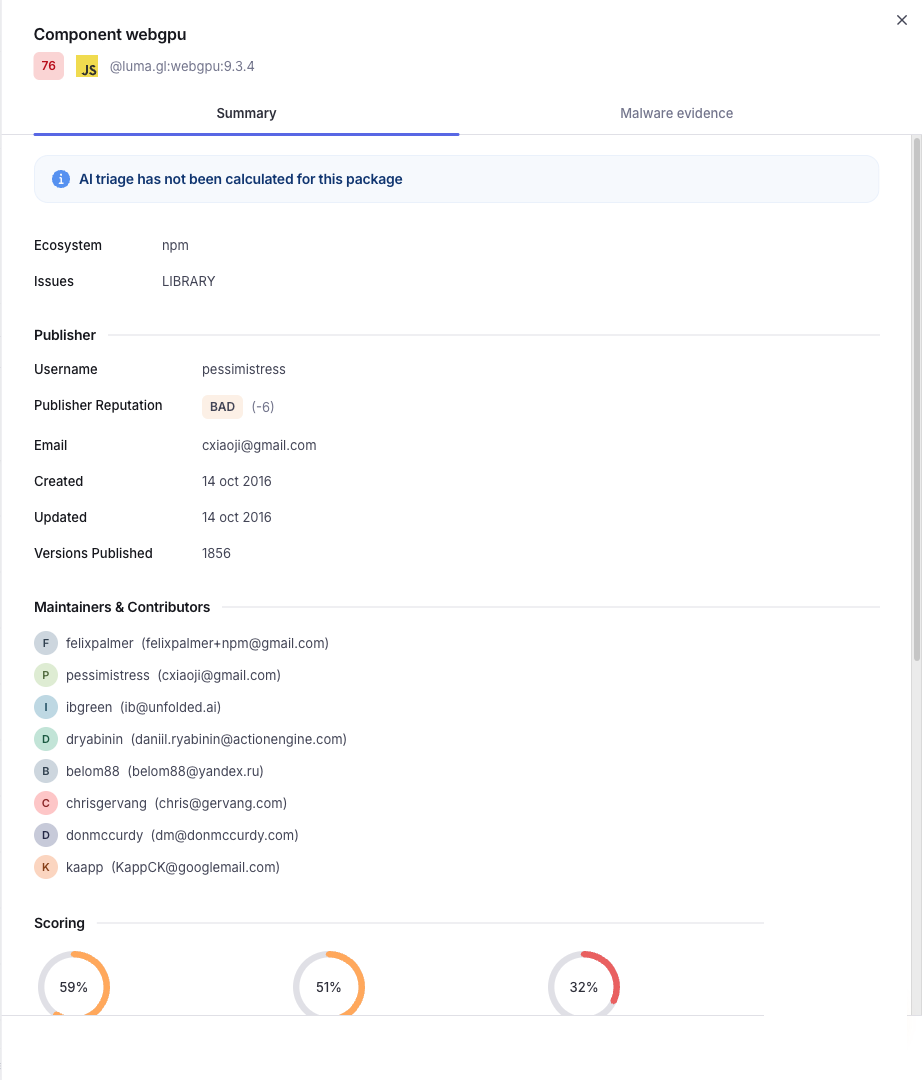
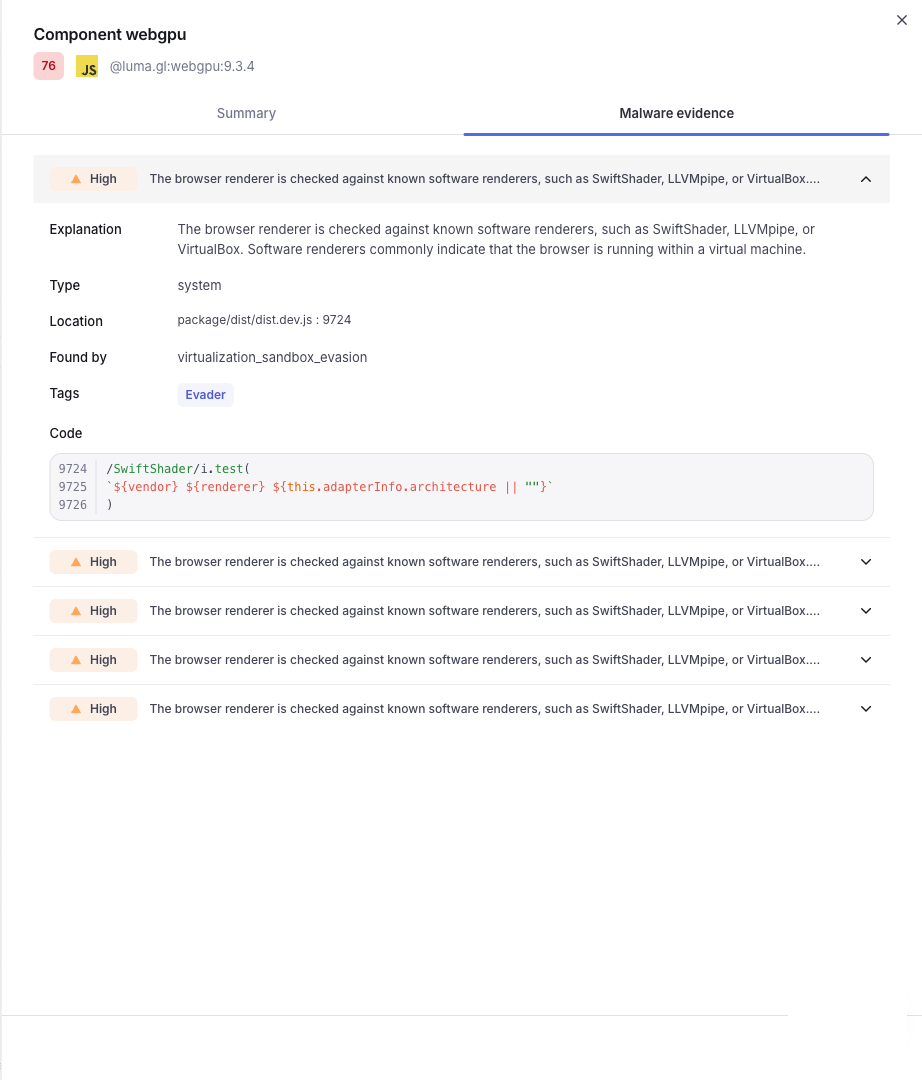
Clicking on the icon of a component with **malware detected by Xygeni** will open a **slide** with details.
**Summary tab** shows detailed information about the component:
* Summary info
* Info about the Publisher
* Malware detected status
**Malware evidence tab** shows detailed information about the code evidences found:
---
# Agent Instructions
This documentation is published with GitBook. GitBook is the documentation platform designed so that both humans and AI agents can read, navigate, and reason over technical content effectively. Learn more at gitbook.com.
## Querying This Documentation
If you need additional information that is not directly available in this page, you can query the documentation by asking a question.
Perform an HTTP GET request on the following URL with the `ask` and `goal` query parameters:
```
GET https://docs.xygeni.io/xygeni-products/malware-db.md?ask=&goal=
```
`ask` is the immediate question: it should be specific, self-contained, and written in natural language.
`goal` is what the user is ultimately trying to achieve, the reason they need the answer. Sharing it helps GitBook give you a better, more relevant answer. A goal is most helpful when it describes the outcome the user wants rather than restating the question. For example, with `ask=how do I create an API token`, a goal like `automate deployments from our CI pipeline` lets GitBook tailor the answer to that use case.
The response will contain a direct answer to the question and relevant excerpts and sources from the documentation.
Use this mechanism when the answer is not explicitly present in the current page, you need clarification or additional context, or you want to retrieve related documentation sections.

 icon of a component with **malware detected by Xygeni** will open a **slide** with details.
**Summary tab** shows detailed information about the component:
* Summary info
* Info about the Publisher
* Malware detected status
icon of a component with **malware detected by Xygeni** will open a **slide** with details.
**Summary tab** shows detailed information about the component:
* Summary info
* Info about the Publisher
* Malware detected status