> For the complete documentation index, see [llms.txt](https://docs.xygeni.io/llms.txt). Markdown versions of documentation pages are available by appending `.md` to page URLs; this page is available as [Markdown](https://docs.xygeni.io/xygeni-products/application-security-posture-management-aspm/inventory/cryptography.md).
# Cryptography
The **Cryptography** page lists the cryptographic assets discovered in your projects — the algorithms, certificates, key material and protocols that make up your **cryptographic inventory**, the prerequisite for any post-quantum migration.
The same assets are what the [CBOM](/xygeni-products/quantum-safe-compliance.md) exports, so the page and the downloaded CBOM always tell the same story.
{% hint style="info" %}
Cryptographic discovery is **not** part of a default scan. A project appears here once it has been scanned with cryptography enabled — `xygeni inventory --cbom cbom.json` (or `--pqc-backlog` / `--crypto-coverage`, which enable it too). See [Generate a CBOM with the Xygeni CLI](/xygeni-scanner-cli/xygeni-cli-overview/generate-cbom-with-the-xygeni-cli.md).
{% endhint %}
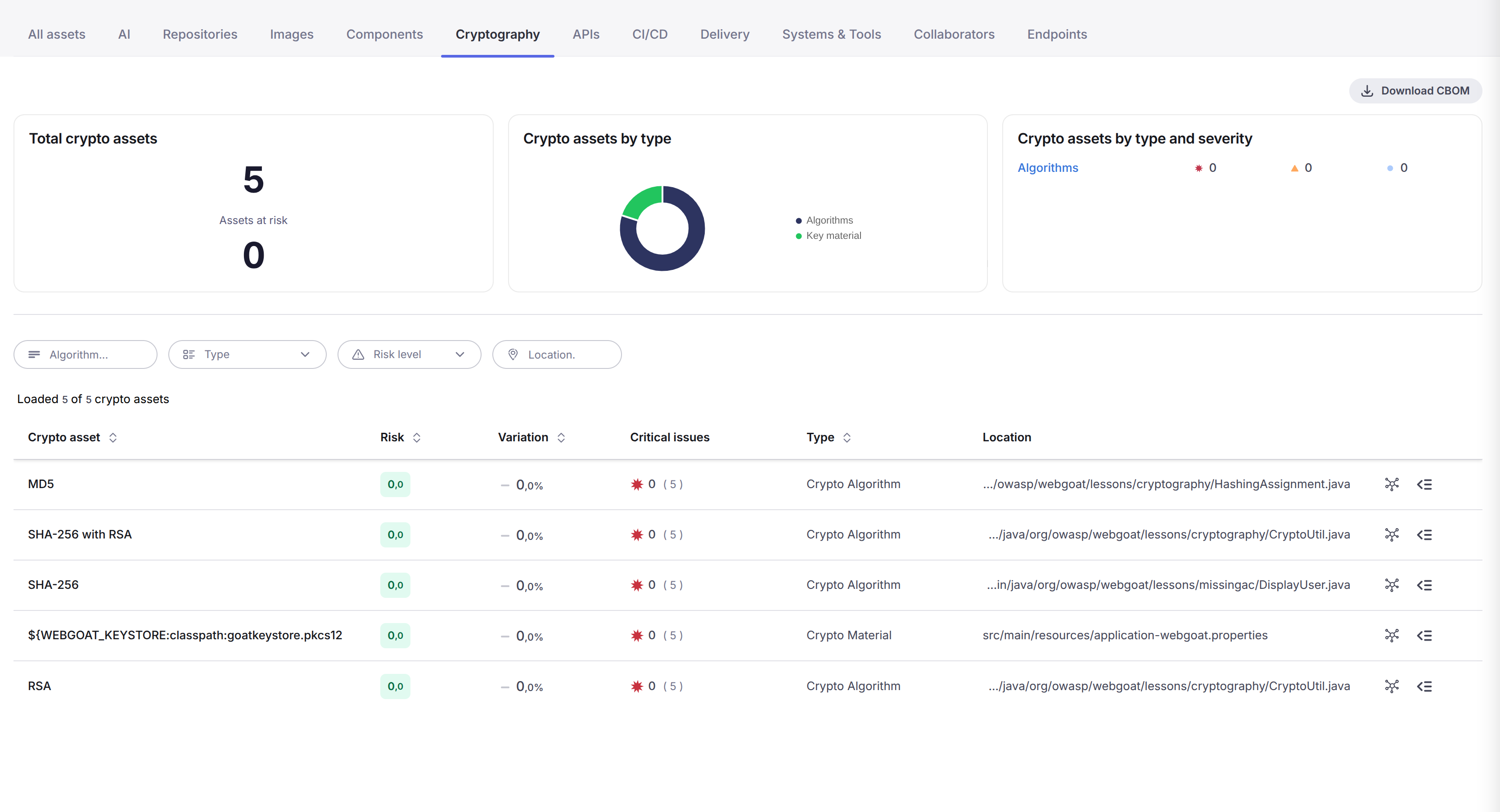
The Cryptography page of the SDLC Inventory
## Asset types
| Type | What it is |
| ---------------------- | -------------------------------------------------------------------------- |
| **Crypto Algorithm** | An algorithm in use — AES-256-GCM, SHA-256, RSA, Ed25519, MD5… |
| **Crypto Certificate** | An X.509 certificate found in the repository or declared in configuration. |
| **Crypto Material** | Key material: private keys, key stores, key references, derived keys. |
| **Crypto Protocol** | A protocol version in use or declared, such as TLS 1.2 / TLS 1.3. |
## Statistics
Three tiles summarise the scope currently selected:
* **Total crypto assets**, together with the number of **assets at risk** (those with security issues), its variation against the project baseline, and the baseline figure itself.
* **Crypto assets by type** — the distribution across algorithms, certificates, key material and protocols.
* **Crypto assets by type and severity** — the same breakdown with the issue counts per severity; clicking a row opens the corresponding risks.
## The asset list
Each row carries:
* **Crypto asset** — the algorithm or asset name.
* **Risk** and **Variation** — the risk level and how it moved against the baseline.
* **Critical issues** — critical findings on the asset, over the total number of issues.
* **Type** — the asset type from the table above.
* **Location** — the file where it was found, or the number of locations when there is more than one.
The two icons at the end of each row open the **pivot graph** for the asset and its **detail** panel.
You can filter by algorithm name, type, risk level and location.
## Asset detail
The detail panel of a cryptographic asset adds what an auditor and a migration owner need, beyond the generic asset information:
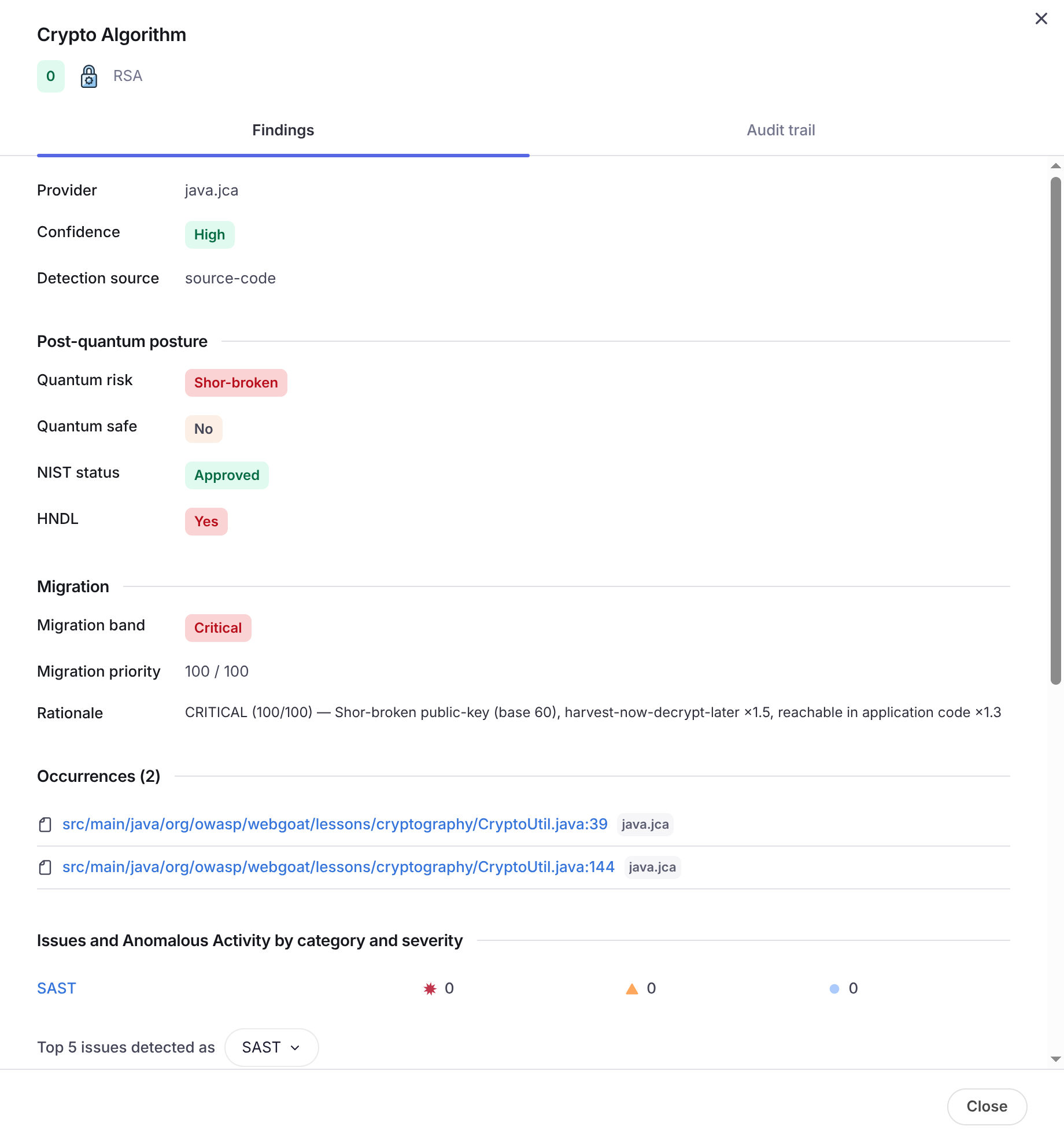
Detail of a crypto algorithm asset
* **Provider**, **Confidence** and **Detection source** — the library or platform behind the asset (for example `java.jca`), how confident the detection is, and which discovery channel found it (`source-code`, `app-config`, `iac-config`, `certificate-file`, `private-key`).
* **Post-quantum posture** — **Quantum risk** (`Shor-broken`, `Grover-weakened`, `PQC-safe`), whether the algorithm is **quantum safe**, its **NIST status**, and whether it is exposed to **harvest-now-decrypt-later** (HNDL).
* **Migration** — the **migration band** (critical / high / medium / low), the **migration priority** score out of 100, and the **rationale** that explains how the score was reached.
* **Occurrences** — every place the asset was found, as `file:line`, each one a link that opens the exact line in your SCM.
* **Issues and anomalous activity** by category and severity, and the top issues detected on the asset — the code and configuration findings that touch this piece of cryptography.
Crypto assets also carry the post-quantum tags (`quantum-risk:…`, `pqc:priority:…`), so they can be filtered and grouped from the **All Assets** page like any other asset.
## Download the CBOM
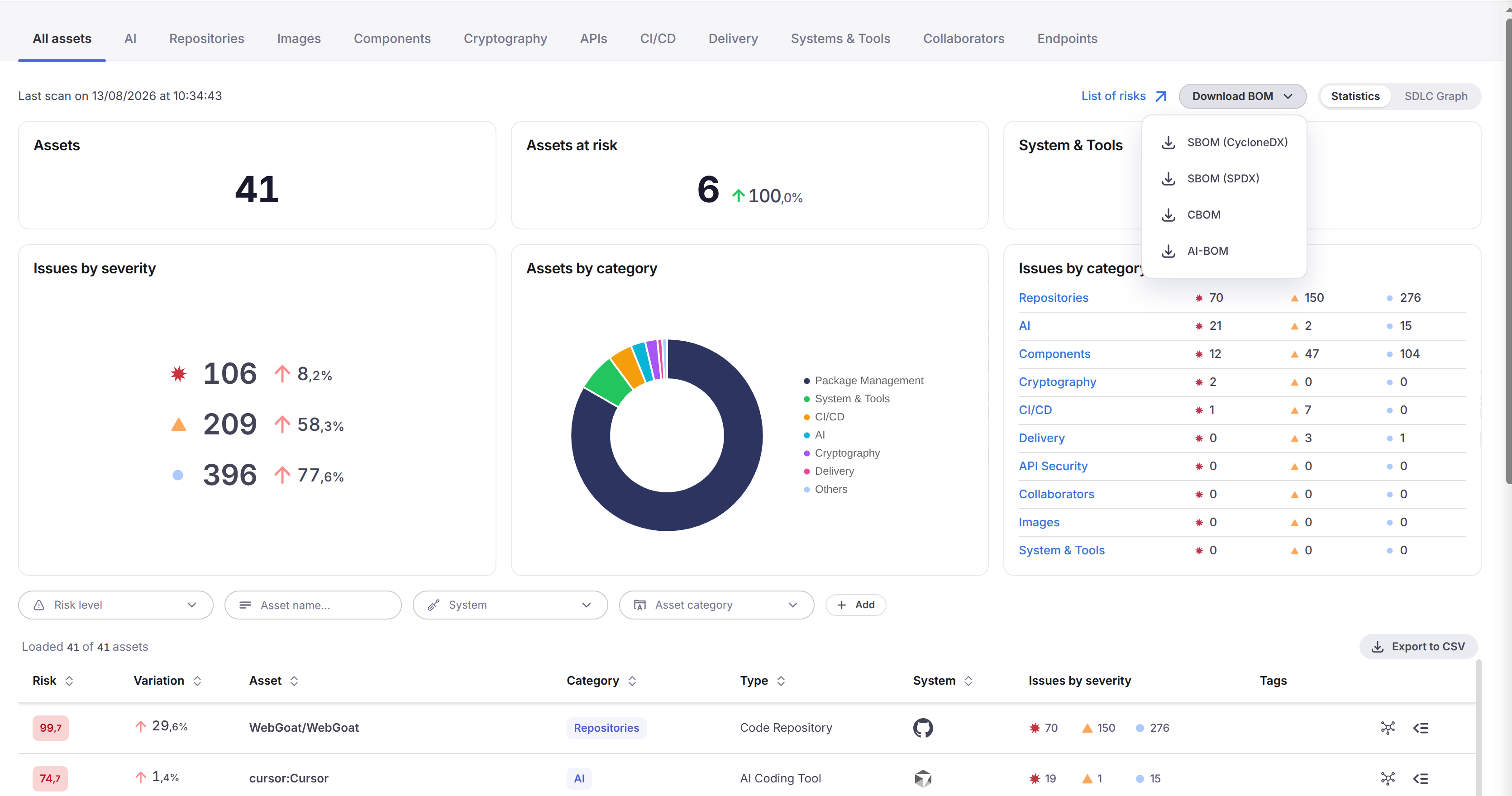
The **Download CBOM** button produces a **CycloneDX 1.6 CBOM** for the current scope. The same document is available from **All Assets** through **Download BOM → CBOM**, alongside the SBOM and the AI-BOM.
The BOM download menu on the All Assets page
* For a **single project** the CBOM is generated on the spot and downloaded as `CBOM-cyclonedx.json`.
* For a **group of projects** it is generated in the background and the download link is emailed to you. Assets found in more than one project are merged, and each occurrence states which project it came from.
* The button is available for a project or a named group, and requires the **SDLC Inventory** feature in your license.
The CBOM is **regenerated from the inventory** each time — nothing is stored — using the most recent analysis that included cryptographic discovery. Two consequences worth knowing:
* A project that has never been scanned with `--cbom` has no cryptographic inventory, and the download reports so instead of returning an empty document. Re-scan it with `--cbom`.
* Crypto assets **survive** later scans that do not include cryptography, so the page and the CBOM do not empty out when a regular `inventory` scan runs; the analysis date carried in the CBOM tells you how fresh the cryptographic inventory is.
## Related pages
* [Quantum-Safe Compliance & CBOM](/xygeni-products/quantum-safe-compliance.md) — the requirements behind this, the coverage map and the migration backlog.
* [Generate a CBOM with the Xygeni CLI](/xygeni-scanner-cli/xygeni-cli-overview/generate-cbom-with-the-xygeni-cli.md) — producing the CBOM from the scanner.
* [All Assets](/xygeni-products/application-security-posture-management-aspm/inventory/all-assets.md) — the full inventory, with cryptography as one more category.
---
# Agent Instructions
This documentation is published with GitBook. GitBook is the documentation platform designed so that both humans and AI agents can read, navigate, and reason over technical content effectively. Learn more at gitbook.com.
## Querying This Documentation
If you need additional information that is not directly available in this page, you can query the documentation by asking a question.
Perform an HTTP GET request on the following URL with the `ask` and `goal` query parameters:
```
GET https://docs.xygeni.io/xygeni-products/application-security-posture-management-aspm/inventory/cryptography.md?ask=&goal=
```
`ask` is the immediate question: it should be specific, self-contained, and written in natural language.
`goal` is what the user is ultimately trying to achieve, the reason they need the answer. Sharing it helps GitBook give you a better, more relevant answer. A goal is most helpful when it describes the outcome the user wants rather than restating the question. For example, with `ask=how do I create an API token`, a goal like `automate deployments from our CI pipeline` lets GitBook tailor the answer to that use case.
The response will contain a direct answer to the question and relevant excerpts and sources from the documentation.
Use this mechanism when the answer is not explicitly present in the current page, you need clarification or additional context, or you want to retrieve related documentation sections.