> For the complete documentation index, see [llms.txt](https://docs.xygeni.io/llms.txt). Markdown versions of documentation pages are available by appending `.md` to page URLs; this page is available as [Markdown](https://docs.xygeni.io/xygeni-administration/platform-administration/security.md).
# Security
### Multi-Factor Authentication
Xygeni allows to configure **email-based Two-Factor Authentication** either only for you or by all the users of the Xygeni account.
When you configure 2FA, after providing credentials in the Xygeni login page, you will receive an email with a code.
Provide such a code to complete your login.
### Generate Token for Scanner and API client
An **Access Token** (also known as 'api token' or 'api key') is used by clients, like the scanner or integrations, to access the Xygeni platform API. It expires automatically after a predefined duration and can be revoked. It is more convenient than alternative user credentials.
The token allows the client to perform certain operations, according to the permissions set:
* Upload scan results.
* Read issues.
* Mute issues.
* Administration: add users, add projects
To create a token in the Xygeni Dashboard, go to the Administration > Security tab, then click on the `Generate new token` button
Describe what the token will be used for, choose the validity period, and select the permissions granted to the token. Click on the `Generate` button:
Each permission enables the client to invoke certain api endpoints. The scanner typically needs permissions to upload the scan results.
For administrative users that may configure the detectors and upload the configuration to be shared by other deployed scanners, add the `Upload configuration` permission.
{% hint style="info" %}
It is recommended to follow the principle of least privilege. Give the token the minimal permissions needed for the intended tasks.
{% endhint %}
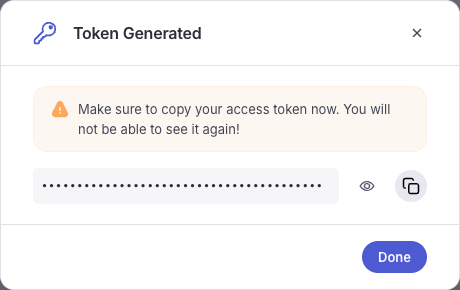
The token is generated, as shown:
Please note that the token itself is not stored by the platform, and will be ignored once the popup is closed. Make sure that you copy the token for use in the scanner, integrations or other api clients.
For example, for the scanner you may write it in the api:
```yaml
api:
url: https://api.xygeni.io
apikey: xya_************
```
{% hint style="info" %}
It is recommended to encrypt the credentials in the scanner configuration using the command [`xygeni util encrypt`](/xygeni-scanner-cli/xygeni-cli-overview/cli-utils.md#encrypt).
{% endhint %}
The token is prefixed by `xya_` (**xy**geni **a**pi) so it could be recognized and detected by secret scanners, to detect any leaks.
---
# Agent Instructions
This documentation is published with GitBook. GitBook is the documentation platform designed so that both humans and AI agents can read, navigate, and reason over technical content effectively. Learn more at gitbook.com.
## Querying This Documentation
If you need additional information that is not directly available in this page, you can query the documentation by asking a question.
Perform an HTTP GET request on the following URL with the `ask` and `goal` query parameters:
```
GET https://docs.xygeni.io/xygeni-administration/platform-administration/security.md?ask=&goal=
```
`ask` is the immediate question: it should be specific, self-contained, and written in natural language.
`goal` is what the user is ultimately trying to achieve, the reason they need the answer. Sharing it helps GitBook give you a better, more relevant answer. A goal is most helpful when it describes the outcome the user wants rather than restating the question. For example, with `ask=how do I create an API token`, a goal like `automate deployments from our CI pipeline` lets GitBook tailor the answer to that use case.
The response will contain a direct answer to the question and relevant excerpts and sources from the documentation.
Use this mechanism when the answer is not explicitly present in the current page, you need clarification or additional context, or you want to retrieve related documentation sections.