# AI Triage

Xygeni AI Triage applies AI-driven analysis to security findings to reduce alert fatigue. For each issue, AI Triage produces three outputs that help teams decide what to fix and when:

* **Verdict** — whether the issue is a real vulnerability, a likely false positive, or needs human review.
* **Remediation Urgency** — when a confirmed vulnerability should be addressed.
* **Remediation Complexity** — how much effort the fix is expected to take.

AI Triage is currently available for the following issue kinds:

* **SAST** (code vulnerabilities)
* **IaC** (infrastructure-as-code flaws)
* **Secrets**
* **SCA** (open-source vulnerabilities) — *no verdict*, only priority and complexity. False-positive detection for SCA is handled by [Reachability](/introduction-to-xygeni/prioritization-funnels/prioritization-funnels-1/reachability.md), not by AI Triage.
* **DAST** (dynamic application security testing)
* **Malware** — internal scan-time scoring only. See [AI Triage for Malware](#ai-triage-for-malware) below.

The triage output and the entry points are not identical for every issue kind. The next sections describe the differences.

## Triage outputs

### Verdict

Stage label in the UI: **AI Triage Result**

| Internal value   | UI label                 | Meaning                                                                                                                                                              |
| ---------------- | ------------------------ | -------------------------------------------------------------------------------------------------------------------------------------------------------------------- |
| `TRUE_POSITIVE`  | Potential True Positive  | The AI is confident the issue is a real vulnerability based on the code context.                                                                                     |
| `FALSE_POSITIVE` | Potential False Positive | The AI is confident the issue is not a real vulnerability — for example, the data is sanitized, the path is unreachable, or the rule does not apply in this context. |
| `NEEDS_REVIEW`   | Needs Review             | The AI did not have sufficient context to reach a confident conclusion. A human reviewer should inspect the issue.                                                   |
| `NOT_CALCULATED` | Not Calculated           | AI Triage has not been executed for the issue.                                                                                                                       |

### Remediation Urgency

Only meaningful when the verdict is **Potential True Positive**.

| Internal value | UI label    | Meaning                                                                                             |
| -------------- | ----------- | --------------------------------------------------------------------------------------------------- |
| `IMMEDIATE`    | Immediate   | Requires attention right now — actively exploitable, publicly reachable, or critical business risk. |
| `ASAP`         | Next Sprint | Must be addressed in the current cycle.                                                             |
| `PLANNED`      | Planned     | Should be included in the next planning cycle.                                                      |
| `BACKLOG`      | Backlog     | Real but low urgency — address when capacity allows.                                                |

### Remediation Complexity

Only meaningful when the verdict is **Potential True Positive**.

| Internal value | UI label | Meaning                                                                                              |
| -------------- | -------- | ---------------------------------------------------------------------------------------------------- |
| `TRIVIAL`      | Easy     | One-line fix or a straightforward API replacement with no architectural impact.                      |
| `MEDIUM`       | Medium   | Moderate refactor that touches multiple methods or classes but remains localized.                    |
| `HARD`         | Hard     | Significant rework — cross-cutting changes, architectural impact, or dependency on external factors. |

## How AI Triage runs

AI Triage can be executed in four ways:

1. **Per issue from the UI** — review the AI assessment for a single issue from the issue slide-out panel.
2. **In bulk from the UI** — select multiple issues in any risks table and trigger triage as a batch action.
3. **From the CLI on demand** — `xygeni util ai-triage` triages an existing report. See [AI Triage (CLI)](/xygeni-scanner-cli/xygeni-cli-overview/cli-utils/ai-triage.md).
4. **Right after a scan** — pass `--triage` to a scan command to triage findings as soon as the scan finishes. See [Single scan](/xygeni-scanner-cli/xygeni-cli-overview/xygeni-cli-operation-modes/single-scan.md#ai-triage-during-a-scan).

The four execution paths apply to **SAST**, **IaC**, **Secrets**, **SCA**, and **DAST**. **Malware** triage is currently scan-time only and consumed internally — see [AI Triage for Malware](#ai-triage-for-malware).

## Individual triage in the UI

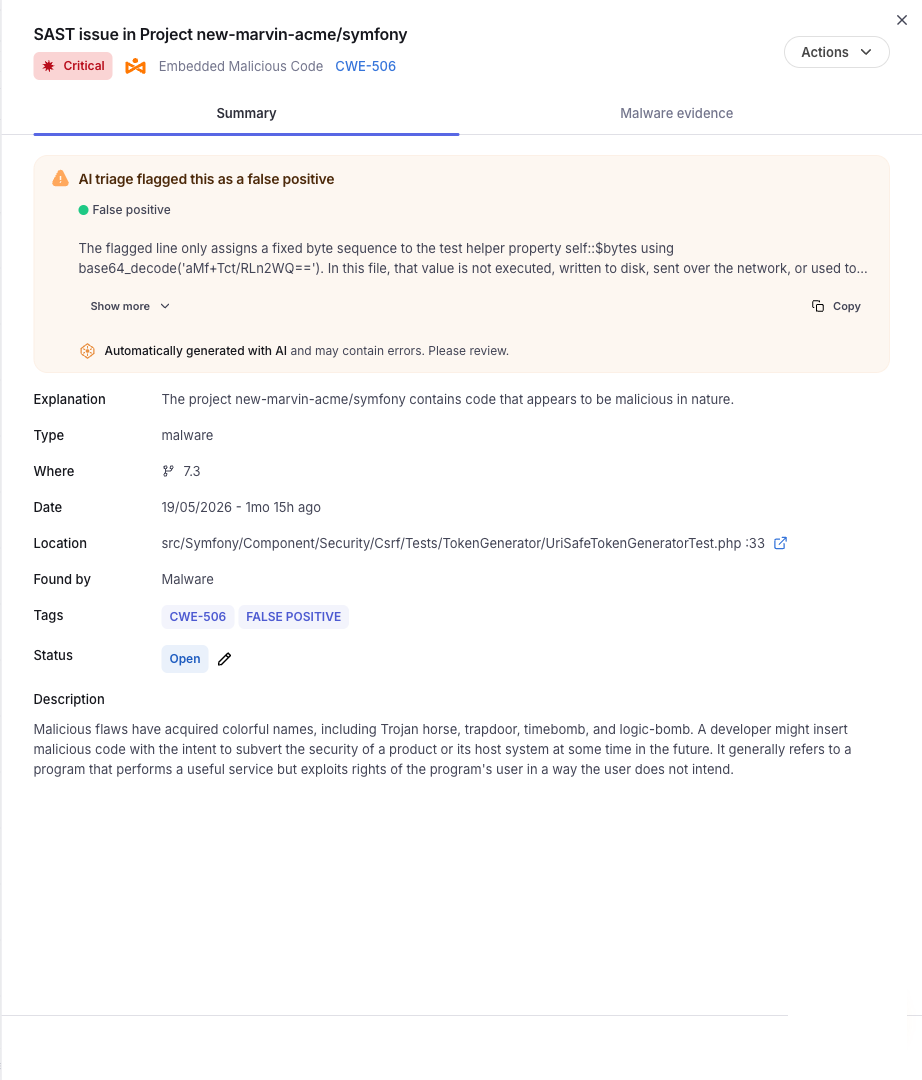
Open any SAST, IaC, or Secrets issue from the risks table to display the issue slide-out. When AI Triage results are available, a dedicated **AI Triage** section is shown with:

* The **verdict** (Potential True Positive, Potential False Positive, or Needs Review).
* The **Remediation Urgency** and **Remediation Complexity** values when the verdict is Potential True Positive.
* The **AI reasoning** — a plain-text explanation grounded in the code context that justifies the verdict and the urgency/complexity assessment.
* The **triage timestamp**.

The same values are also surfaced as tags in the issues list so teams can filter and group by them at a glance.

<figure><img src="/files/bbA3KDMj1S5z5weDiFIN" alt=""><figcaption><p>SAST issue slide-out with the AI Triage section and the triage tags in the header</p></figcaption></figure>

## Batch triage in the UI

Bulk triage is available from any risks table — both the global per-project view and the product-specific tables (SAST, IaC, Secrets).

1. Open the risks table and select the checkbox on the left for each issue you want to triage.
2. Open the **Actions** menu (active once at least one issue is selected).
3. Choose **AI Triage**.

The selected issues are sent to the triage engine, and once finished the verdict, urgency, complexity, and reasoning are written back to each issue and become available in the issue slide-out and as tags.

{% hint style="info" %}
The **Actions** tab is only enabled once at least one issue has been selected.
{% endhint %}

<figure><img src="/files/hHgEJRExnBfkRA3CZIQJ" alt=""><figcaption><p>Risks table with an issue selected, ready to run AI Triage as a bulk action</p></figcaption></figure>

## Triage tags

After triage, every triaged issue is tagged with the resolved values so you can filter the risks table or build saved views around them:

**Verdict tags**

* `ai-triage:potential-true-positive`
* `ai-triage:potential-false-positive`
* `ai-triage:needs-review`

**Remediation Urgency tags**

* `remediation-urgency:immediate`
* `remediation-urgency:next-sprint`
* `remediation-urgency:planned`
* `remediation-urgency:backlog`

**Remediation Complexity tags**

* `remediation-complexity:easy`
* `remediation-complexity:medium`
* `remediation-complexity:hard`

## AI Triage in the SAST prioritization funnel

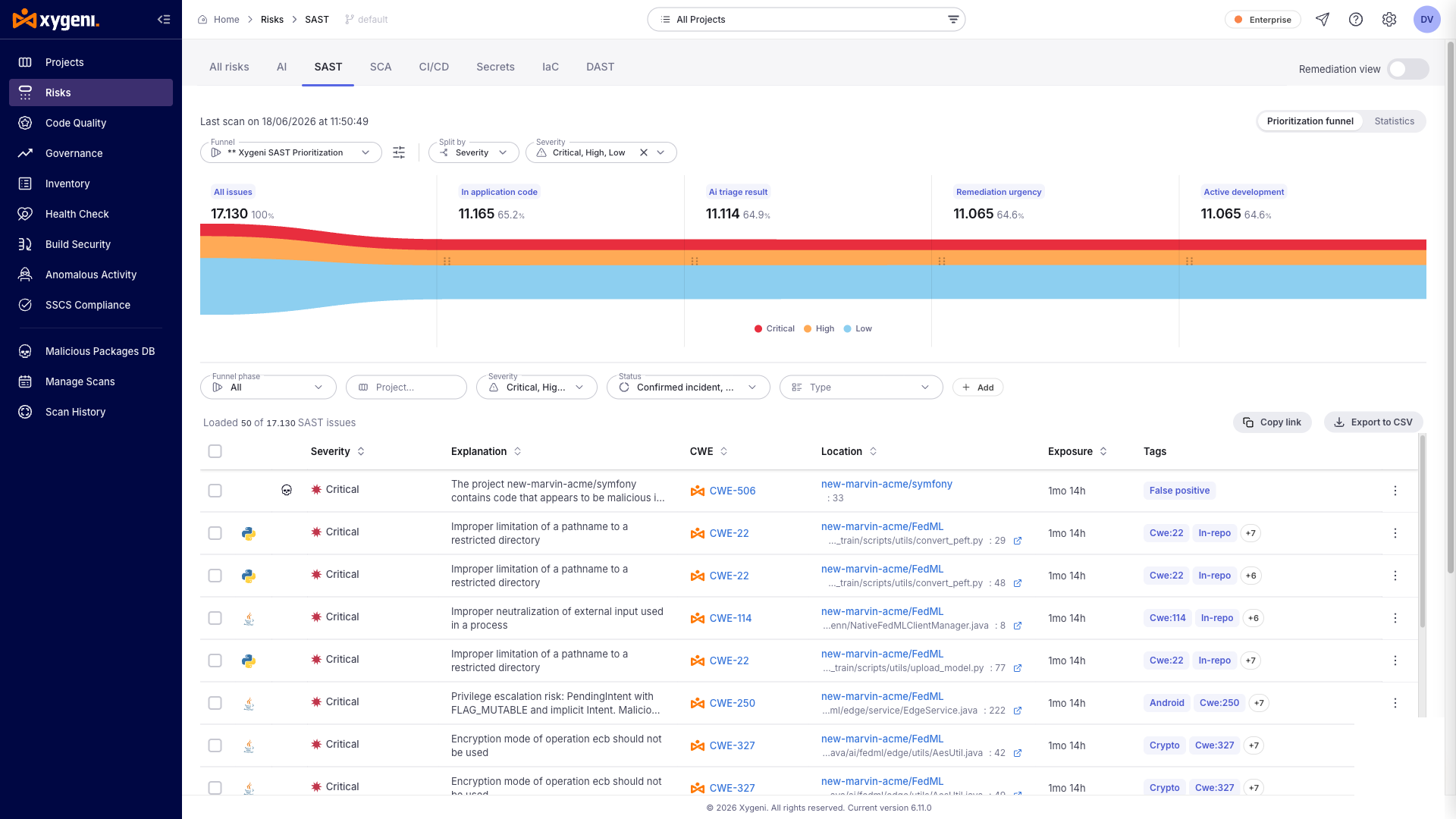
The default SAST [Prioritization Funnel](/introduction-to-xygeni/prioritization-funnels.md) includes AI Triage as part of its standard stages so the triage outcome directly shapes what reaches the developer. Two AI Triage outputs become funnel stages:

* [**AI Triage Result**](/introduction-to-xygeni/prioritization-funnels/prioritization-funnels-1/ai-triage-result.md) — filters out AI-confirmed false positives.
* [**Remediation Urgency**](/introduction-to-xygeni/prioritization-funnels/prioritization-funnels-1/remediation-urgency.md) — orders confirmed vulnerabilities by how soon they must be fixed.

**Remediation Complexity** is also produced by AI Triage but is not part of the funnel — it is shown in the issue slide-out and as a tag on each triaged issue, so you can sort, filter, and plan around it.

<figure><img src="/files/rD33JefW7KM2O9v0VWY7" alt=""><figcaption><p>Default SAST prioritization funnel with the AI Triage Result and Remediation Urgency stages</p></figcaption></figure>

{% hint style="info" %}
AI Triage funnel stages are currently available for SAST only.
{% endhint %}

## AI Triage for SCA

For SCA findings, AI Triage produces:

* **Verdict** — fixed at **Potential True Positive**. False-positive detection for SCA is handled by [Reachability](/introduction-to-xygeni/prioritization-funnels/prioritization-funnels-1/reachability.md), not by AI Triage.
* **Remediation Urgency** — derived from exploitation-risk signals: EPSS score, public exploit availability, CVSS, [Reachability](/introduction-to-xygeni/prioritization-funnels/prioritization-funnels-1/reachability.md), CWE, direct vs transitive scope, and whether the dependency is part of application code.
* **Remediation Complexity** — derived from the candidate upgrade(s) for the vulnerable component: source/binary compatibility with the project, bump type (patch/minor/major), and whether a fix exists. A patch-level upgrade that is source-compatible with the project is **Easy**; an incompatible major bump (or a finding with no fix available) is **Hard**.
* **AI reasoning** — cites the CVE, the exploitation signals that drove the urgency, and the candidate upgrade chosen for the complexity assessment.

The Urgency and Complexity values come from the standard tables above.

### Where SCA triage is available

* **Scan-time** — pass `--triage` to a scan that produces SCA findings: `xygeni deps --include-vulnerabilities --triage`, `xygeni scan --include-vulnerabilities --triage`. The flag is rejected on `xygeni deps` and on `xygeni scan` when `--include-vulnerabilities` is not set.
* **CLI on demand** — `xygeni util ai-triage` accepts a deps report produced with `--include-vulnerabilities`, an `sca` report, or the SCA portion of a combined `scan` report. See [AI Triage (CLI)](/xygeni-scanner-cli/xygeni-cli-overview/cli-utils/ai-triage.md).
* **Dashboard** — single and bulk on-demand triage from the SCA risks table and the SCA issue slide-out, exactly like SAST.

In the SCA risks table the AI Triage values are exposed as filters (Urgency, Complexity); the AI Triage panel in the issue slide-out shows the full reasoning.

## AI Triage for DAST

For DAST findings, AI Triage produces the same outputs as SAST: **Verdict** (Potential True Positive / Potential False Positive / Needs Review / Not Calculated), **Remediation Urgency**, and **Remediation Complexity**. The reasoning is grounded in the HTTP request/response evidence, the vulnerability type, the endpoint criticality, and any WAF or scanner-heuristic signals captured during the scan.

DAST triage is particularly aimed at identifying common DAST false-positive patterns from evidence alone:

* **WAF or middleware interception** — the attack was blocked upstream and the scanner mistook the block-page response for a vulnerable response.
* **Benign reflection** — the payload is reflected in the response but is HTML-encoded (or otherwise neutralised), so the application is not actually vulnerable.
* **Scanner heuristic misfires** — custom error pages, redirects, or unusual content types that match the scanner's vulnerable-response pattern by coincidence.

When the evidence is ambiguous (partial reflection, unclear WAF behaviour, low-confidence heuristic), AI Triage returns **Needs Review** rather than guessing.

### Where DAST triage is available

* **Scan-time** — pass `--triage` to the DAST scan command.
* **CLI on demand** — `xygeni util ai-triage` accepts a DAST report.
* **Dashboard** — single and bulk on-demand triage from the DAST risks table and the DAST issue slide-out.

### DAST prioritization funnel

The DAST [Prioritization Funnel](/introduction-to-xygeni/prioritization-funnels.md) gains two filter categories derived from the AI Triage output and the DAST evidence, in addition to the AI Triage Result and Remediation Urgency stages:

* **Authentication** — `Authenticated` (the endpoint requires authentication) vs `Public`.
* **Exposure** — `Exposed` (the attack reached the application — not blocked by WAF/middleware) vs `Protected` (intercepted upstream).

These categories combine with the AI Triage filters and with each other (for example, Potential True Positive with Immediate urgency on Public Exposed endpoints). Raw scanner attributes (vulnerability type, scanner heuristic, confidence level) remain available as list filters but are not funnel stages.

## AI Triage for Malware

For Malware scans, AI Triage v1 is **scan-time only and consumed internally**. When you pass `--triage` to a malware scan, the AI assesses the confidence of each evidence produced by the scanner, and the resulting signal feeds directly into the **project-level maliciousness score**.

```bash
xygeni malware -d <dir> --triage
```

A scan with many low-confidence evidences yields a lower triage-adjusted score than a scan with a few high-confidence ones, even if the raw evidence count is the same.

{% hint style="info" %}
v1 does **not** expose per-evidence verdicts, on-demand triage, or `xygeni util ai-triage` for malware findings. The only user-visible effect is the calibrated project-level maliciousness score. Per-finding triage and dashboard integration are planned for a later release.
{% endhint %}

When the AI Triage service is unavailable, the malware scan falls back to the existing non-triaged scoring, emits a warning, and completes successfully — the scan does not fail because of triage outages.

## Related

* [AI Triage (CLI)](/xygeni-scanner-cli/xygeni-cli-overview/cli-utils/ai-triage.md) — standalone `util ai-triage` reference.
* [Single scan](/xygeni-scanner-cli/xygeni-cli-overview/xygeni-cli-operation-modes/single-scan.md#ai-triage-during-a-scan) — running triage as part of a scan with `--triage`.
* [Auto-fix](/xygeni-administration/platform-administration/projects-management/auto-fix.md) — AI-generated fixes for SAST issues.
* [Xygeni Bot](https://github.com/xygeni/UserDoc/blob/main/scan-management/xygeni-bot.md) — supported AI providers and `xygenibot.yml` configuration shared with AI Triage.


---

# Agent Instructions: Querying This Documentation

If you need additional information that is not directly available in this page, you can query the documentation dynamically by asking a question.

Perform an HTTP GET request on the current page URL with the `ask` query parameter:

```
GET https://docs.xygeni.io/xygeni-administration/platform-administration/projects-management/ai-triage.md?ask=<question>
```

The question should be specific, self-contained, and written in natural language.
The response will contain a direct answer to the question and relevant excerpts and sources from the documentation.

Use this mechanism when the answer is not explicitly present in the current page, you need clarification or additional context, or you want to retrieve related documentation sections.